Huawei Wallet Octopus
Huawei Wallet Octopus gives you the unparalleled convenience of using your Huawei mobile device¹ for payment anywhere Octopus is accepted. With Huawei Wallet Octopus, you can ride or shop by just tapping your Huawei mobile device¹ on Octopus readers. No need to open an app or wake your device. Check your balance and skip queues by topping up using your UnionPay cards².
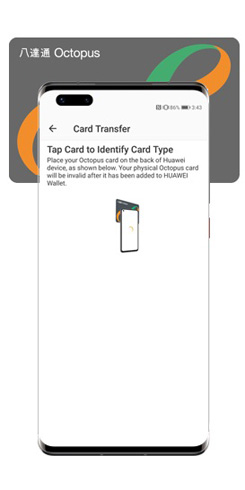
For tourists from Chinese Mainland, Macao or Singapore, it is easy to get an Octopus before or after you arrive Hong Kong. Simply sign in Huawei Account with Chinese Mainland, Macao or Singapore as the registered region, and download Octopus App for Tourists from AppGallery for adding a new Octopus. If you already have a physical Octopus card³, you can also transfer it to your Huawei mobile device¹ easily.
The stored value limit of Huawei Wallet Octopus is HK$3,000. It comes with a deposit of HK$50, and once it is no longer needed, you can easily apply for a refund through the Octopus App for Tourists.
Download Octopus App for Tourists
You can search and download from AppGallery

Pay for transit and enjoy cashless shopping in Hong Kong
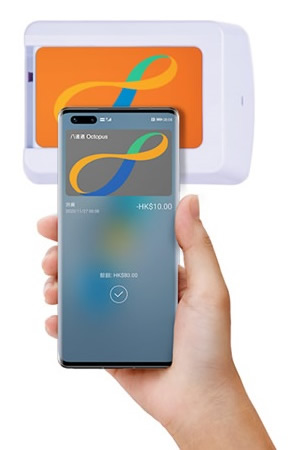
You can use Huawei Wallet Octopus at over 180,000 Octopus acceptance points, covering an extensive range of public transport, retail outlets, vending machines, self-service kiosks and more.
Making payment is easy! Simply hold your Huawei mobile device¹ near an Octopus reader as you go through ticket gates or shop in retail outlets, without opening an app, or even when the screen is off.
Simple steps to add an Octopus in Huawei Wallet
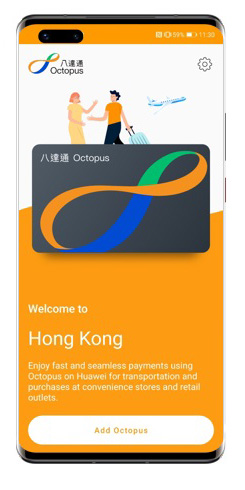
Select "Add Octopus"
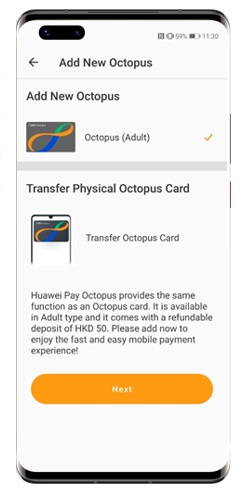
Select "Add Huawei Wallet Octopus", then tap "Next"
Select “Pay with Huawei Wallet” to pay the Top-Up Amount
You can add a new Octopus with Octopus App for Tourists.
Download "Octopus App for Tourists" and follow these steps:
If you have downloaded Octopus App for Tourists from AppGallery, you can follow these steps:
- Open Octopus App for Tourists, then tap "Add Octopus"
- Select "Add New Octopus", then tap "Next"
- Read and agree to the "Important Notes to Customers", then tap "Confirm and Next"
- Select “Pay with Huawei Wallet” to pay the Top-Up Amount
- Follow the steps to add a new Octopus to your Huawei mobile device¹
Alternatively, if you have Huawei Wallet, you can also:
For Huawei mobile devices running HarmonyOS 6.1.0.135 SP8 or above:
- Open Huawei Wallet, tap the “+” icon on the home screen and then select "Add Cards"
- Select “Transit Card”
- Choose Octopus and follow the instructions to complete the card setup
For Huawei mobile devices running HarmonyOS 5.0 or below:
- Open Huawei Wallet, tap the “+” icon on the home screen and then select "Add Cards"
- Select “Transit Card”
- Choose Octopus and follow the instructions to complete the card setup
Reload on the go
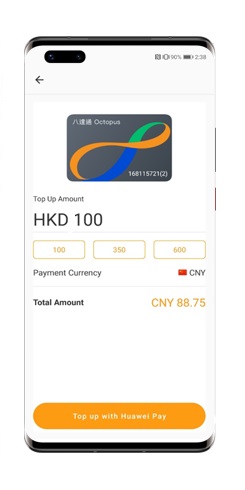
Enter the amount to top up your Octopus
You can top up your Huawei Wallet Octopus using a UnionPay card² in your home currency anytime, anywhere, with Octopus App for Tourists.
- Open Octopus App for Tourists
- Tap the "Top up" button
- Enter the amount to top up your Octopus, then press "Pay with Huawei Wallet”
Same as a physical card, you can also add funds to this Octopus with cash at thousands of locations throughout Hong Kong.
Instant transaction tracking for peace of mind
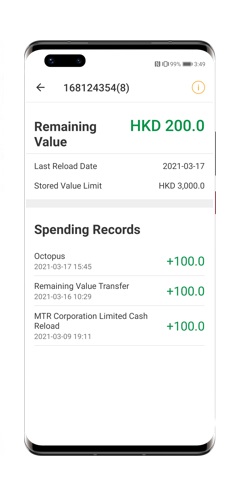
Check your Octopus' Remaining Value and Spending Records from the app
You can keep track of your spending history and balance via Octopus App for Tourists, so you don't have to remember the details.
Apply for a refund
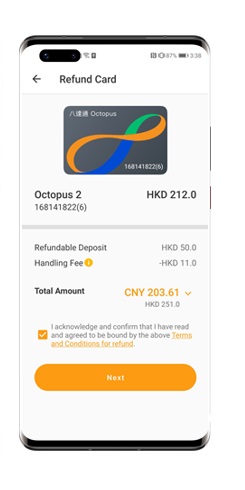
Request for a refund from Refund Card section
If you would like to apply for a refund of the deposit and remaining value on your Octopus, please make the request directly in Octopus App for Tourists. The amount will be refunded to the credit or debit card you used to top up your Huawei Wallet Octopus.
Here is the steps for applying refund:
- Open Octopus App for Tourists
- Tap "Refund Card"
- Follow the steps to refund the deposit and remaining value on your Octopus to your credit / debit card
Octopus App for Tourists - System Requirement
| System Requirement |
|---|
|
| Useful Tips |
|---|
|
¹ To check compatible mobile devices for Huawei Wallet Octopus, please click here for more details.
² Only Chinese Mainland, Macao or Singapore issued UnionPay credit or debit cards are accepted. To check the supported banks and UnionPay cards, please click here for more details.

Remarks:
- Huawei Wallet Octopus is designated as a "Mobile Octopus" and is issued subject to the "Conditions of Issue of Octopus".
- Please use your Huawei Wallet Octopus regularly. If it does not have any add value or payment transactions for three years, it will become an Inactive Mobile Octopus and you will have to pay the Inactive Mobile Octopus Administrative Fee.
- A handling fee of HK$11 will be charged for any Octopus cancelled within 90 days from the date of issue.
- Refund may take 6-8 weeks to be credited to the credit or debit card you used to top up the Huawei Wallet Octopus.