Daily Transaction Upload and Settlement Verification
Merchants are reminded to upload all transaction records of all Octopus readers every day or within the specific period stated in the service agreement. Upon receipt of settlement reports, merchants should immediately verify reports’ details, including settlement amount, and report to their first-line technical support team should there be data or financial discrepancies. To avoid late or expired transactions, merchants are recommended to re-upload the transactions the following day if there are data discrepancies in the settlement report. Merchants should submit claims to Octopus timely if data re-upload does not resolve the discrepancies.
Incomplete transaction handling Do's and Don’ts
An incomplete transaction may occur when an Octopus is removed too quickly from the Octopus Reader, or when an Octopus is presented at the reader at the same time with another Octopus or contactless smart card. Merchant can refer to this link to get more details about incomplete transactions: https://www.octopus.com.hk/en/consumer/octopus-cards/proper-use/incomplete-transaction/index.html.
Here are tips on handling incomplete transactions:
Do:
- Ask customer to again tap the same Octopus card to complete the transaction.
- Encourage customer to put the card closer to Octopus Reader, and hold until the “dood” sound is heard.
Don’t:
- DO NOT void the ticket when an incomplete transaction occurs.
Octopus Secure Data Exchange (OSDX) Channel for Data Transfers through Broadband Internet
OSDX is the major Octopus data transfer channel for Octopus merchants, which is becoming popular since its introduction. OSDX can support broadband internet to provide a more secure and faster data transfer service. Merchants should use an OSDX supportable version of Operating System with Anti-virus software installed in the workstation or system. For details, please contact your Technical Team/System Integrator or our Equipment Management Services Team.
Tips of Installing Octopus Reader in Proximity to Other Contactless Payment Readers
Some service providers may install multiple contactless readers in proximity for providing integrated payment service. To maintain transaction performance in these particular applications, OCL released a new version of Type Approval Requirements on 24 Apr 2020, for specifying requirements about the reader installation and integration.
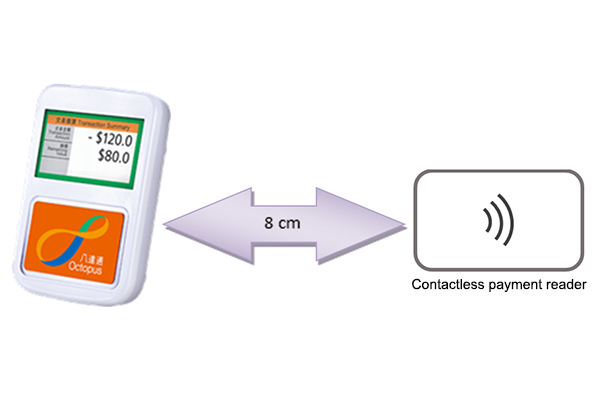
- When a contactless payment reader is placed adjacent to an Octopus reader, the distance between the readers should be at least 8 cm for minimizing interference during transactions.
- The contactless payment readers should face the same direction, i.e. not facing to each other with radio-frequency fields directly affecting each other.
- Octopus readers should not be placed near materials which absorb or distort radio-frequency fields, e.g. metal surface or conductive sheets. A separation of minimum 2 cm from these materials is required.
- Service providers should apply adequate design and installation measures to ensure transaction performance of Octopus readers is not affected by the contactless payment readers installed in proximity. OCL Type Approval Team verifies the transaction performance of the integration by conducting performance test on Octopus readers.